
Loops
Oftentimes in code, there is a need to repeat the same action multiple times in a row. For instance, if you know your grades are about to be released, you might repeatedly check them until they come out. In Java we can use loops to do this.
In this lesson, we’re going to cover two main types of loops: while loops and for loops.
There is another type of loop, the do-while loop. We will not be covering it because it isn’t commonly used in FRC. However, if you want to learn more about do while loops, you can learn more on w3school’s page on do while loops
Conditionals and loops may seem similar but they have different purposes. Conditionals and loops both control the flow of programs. Conditionals are used to run a block of code once, whereas a loop can run a block of multiple times
while loops are the most simple type of loops.
The syntax of a while loops is as shown:
while (condition) { // code to run when condition is true}You might notice that a while loop looks very similar to the if conditional, which was discussed in the previous lesson.
A while loop includes:
- the
whilekeyword to declare that we’re making awhileloop ( )to hold the condition that is either true or false. Example: (5 > 1) is a condition and it is true because 5 is greater than 1{to denote the opening of the loop’s code block}to denote the end of the loop’s code block
The following flowchart demonstrates how a while loop works:
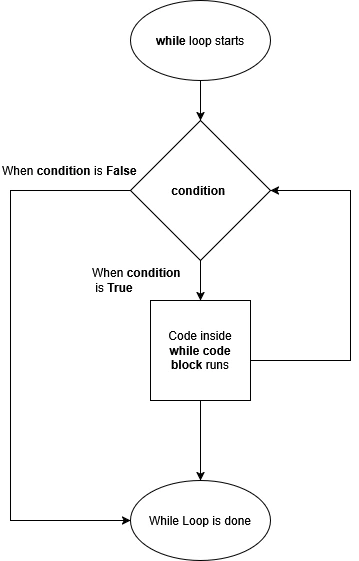
Like the if conditional, the while loop will run its code block if the condition is true.
Unlike the if conditional, however, when the code block is done, the while loop will evaluate its condition again.
If the condition is still true, the code block will run again.
This will repeat until the condition is false.
Also unlike the if conditional, a while loop (or any other type of loop) can’t have any else statements attached.
This means that if the condition is false when the loop is first encountered, the entire thing is skipped.
Let’s look at an example:
int i = 0;while (i < 6) { System.out.println(i); // prints 0, 1, 2, 3, 4, 5 i++;}In the example, there is an int called i which holds the value 0. The while loop has the condition i < 6.
First, the compiler checks if the condition is true.
We know that 0 is less than 6 so the while code block runs and the value of i, which is currently 0, is printed to the terminal.
The value of i is also updated because of i++ and it changes to 1.
Now the condition checks if 1 is less than 6. We know that it is true, so the value of i gets printed and the value of i is increased by 1.
This repeats and eventually i’s value becomes 6.
Now, when the condition is evaluated, it’s false, as 6 is not less than 6, so the loop is complete.
Does the i++ look familiar? This was covered in the operator section. If
you need a refresher on what an operator is and how it works, check out the
operator page.
Lets look at an another example! In the example below we have:
int timer = 0;
while (timer <= 5) {  if (timer < 5) {    System.out.println("Drive Forward");  } else {    System.out.println("Stop Driving");  }  timer++;}
Without running the code, what do you think happens?
timer is set to 0, and the while loop’s condition is checking if timer is less than or equal to 5.
0 is less than 5, so the code enters the while loop.
Now the if statement checks whether timer is less than 5.
0 is less than 5, so it prints out Drive Forward.
The if statement is done, and the code runs timer++, which increases timer’s value by one.
The code goes back to the while loop.
1 is less than 5, so the code enters the while loop again.
For the if statement, 1 is less than 5.
Therefore, Drive Forward gets printed out again.
This repeats 4 times until timer is 5.
Once this happens, the if statement is skipped since 5 is not less than 5.
Now the else runs and prints out Stop Driving, timer’s value increases to 6, 6 is not less than 5, so the code stops running.
With the power of while loops, we’re able to repeat a block of code any number of times, like so:
int i = 0;while (i < 6) { System.out.println("Hi!"); i++;}This loop depends on 3 important statements:
int i = 0;, i < 6, and i++.
For loops allow us to inline these statements:
for (int i = 0; i < 6; i++) { System.out.println("Hi!");}Using the previous example, we can see that the for loop syntax includes:
- the
forkeyword to declare that we’re making aforloop ()to hold the three statements which allow the loop to run{to denote the opening of the loop’s code block}to denote the ending of the loop’s code block
The three statements are
- initialization: creates a variable that sets the starting point of the loop.
This is the
int i = 0;seen in the previous example. - condition: a condition, which uses the variable, that is checked before each iteration.
This is
i < 6;. If the condition is true, the code inside the loop runs - update: updates the variable created in initialization after each iteration.
Lastly, that’s
i++;
All 3 statements are optional, but the semicolons must be present. However, the examples in this section will use all statements.
Let’s look at another example:
for (int i = 0; i < 5; i++){ System.out.println(i); // prints 0, 1, 2, 3, 4}In this example, we create a variable i that is set to 0. When i is less than 5, the for code block runs, printing the value of i which is 0.
Then it goes back to the update statement which is i++, i has increased by 1 and i’s value is now 1.
We check the condition, 1 is less than 5, so for code block runs, the new value of i is printed, i is updated and this repeats until i is no longer less than 5.
When i is no longer less than 5, the for loop is skipped.
Be Careful about Infinite Loops
Section titled “Be Careful about Infinite Loops”It is important to make sure that the condition can become false. If the condition is always true, the loop will always run causing an infinite loop. When an infinite loop happens, the code never stops. This can be unsafe if the code is running a robot mechanism. This could cause a robot to never stop driving forward or an arm to always move. Infinite loops can be prevented by ensuring that the value inside the condition changes by incrementing or decrementing.
When diving into FRC programming, you will find that infinite loops are occasionally encouraged (such as in commands). This will be talked about more in Stage 1
int timer = 0; if (false) { while (timer < 7){ drivetrain.setThrottle(1); // sets drive motors to full speed } }In this example, we want our drive train to run for 7 seconds.
We have our variable called timer which is set to 0.
0 is less than 7 so the code inside runs and the robot drives forward at full speed.
However, timer’s value never changes.
This means timer will always be 0. 0 is less than 7 so the loop will continuously run and the robot never stops driving!
To fix this, we would make sure to increment the timer value as shown below.
int timer = 0; while (timer < 7){ drivetrain.setThrottle(1); // sets drive motors to full speed timer++; // increments timer by 1 }timer now increments by 1 each time the loop is run, and the robot will stop driving after 7 seconds.
Loops Exercise
Section titled “Loops Exercise”WIP